Derek Hodgson Talk

[14/10/2012]

It was great to hear the thoughts of someone with a wealth of experience in designing chairs. Learning about the history and evolution of office chairs was extremely helpful in helping us to better visualise what the chair of 2035 might look like. Getting to test out some high end chairs was also hugely beneficial. Given the significant amount of time people spend in their office chair, it is easy to see why many will invest large amounts of money on chairs they believe provide the most comfort and support.

Below is a series of photos of chairs from the designers Derek mentioned in his lecture.


Video Killed the Design Journal Star

[22/10/2012]


This is the video prototype for my “bespoke” chair idea. The video shows the first user (myself) working in a future office with a large wall screen being controlled by a tablet (and not by gesture control). What I found after several minutes of imitating gesture control was that my arms started to hurt and therefore i think it would be unrealistic to expect people to interact with technology in this fashion for prolonged periods. The video then shows the first user leaving, before another (Photogenic Phil) walks in. Having reset itself to the maximum width, height etc the chair then self-adjusts to Phil’s dimensions and he begins working. This scene was included to show what it would be like to work in general office “hub” where chairs in any part of the hub could be used by any worker. This sort of environment would require a chair that can adjust itself to any body shape, preferably with a minimal amount of effort required from of the user. This concept chair attempts to achieve that aim and, in that sense, would be universally “bespoke”.


Personally, I would have liked to have done the video prototype a little later in the project. The concept was very much in its infancy - i only had one page of sketches on it and i hadn't had a chance to discuss it with the group. The deadline forced me to make a cardboard model and then film users' interaction with it much earlier than i otherwise would have. Given this i don't think i gained a lot of insight from the video prototype although the skills I learned in video editing will be valuable going forward.

User Scenarios and Timelines


[26/10/2012]

 User 1
Name: John
Age: 25
Occupation: Computer Programmer 
Education: Masters Degree
Marital Status: Single
Dependants: None
Home Life: Renting accommodation
Working towards: Getting on the property ladder
Health concerns: Diabetes and obesity


John wakes up around 8am and immediately puts on his AR glasses. He ignores the advice of his “doctor” app and goes to the kitchen where his glasses guide him through making a full English breakfast before he takes his diabetes medicine. He checks his emails/facebook and watches the news using the voice commands and gesture control capabilities of his AR system.
    He leaves the house around 8:40 and gets on a driverless bus to the general office space (or “hub”) where he works. He goes to his own cubicle where he signs on to his employer’s (Skynet Technologies’) main system. The cubicle itself appears blank - identical to all the others in the hub - but through his AR glasses it appears exactly as he wishes it to. The chair in his office was an additional extra and, along with a flat surface, is the only physical product in the office. He is given his daily assignments by his employer and will be free to leave once he has finished his allotted tasks.
    He works from 9 until 11, then he takes a short break where he eats crisps and a bar of chocolate with a fizzy drink. He continues his work until 1 and then goes for his lunch in the main cafeteria. Once there, he goes for the fast food option and pays using his thumbprint. He sits with the only other Skynet employee and discusses the latest tech news.
    He returns to his desk at 1:40 and works straight through to 3pm by which time he has finished his assignments and is free to go home.
    Once home, John watches TV until 6 and then cooks the ready-made meal he is having for his dinner. After this he goes to his video games room. Sitting in his gamer’s chair in his gamer clothes (both of which can relay mild impacts to the user to replicate the impacts felt by his avatar) he spends the next 4 hours playing Call of Duty online with his friends. Due to the “full immersion effect” he experiences, John loses all sense of time and spends the evening snacking and drinking fizzy juice.
    At around 11 he finishes his game and goes to bed after removing his AR glasses.


User 2
Name: Mary
Age: 65
Occupation: Fashion designer
Education: Bachelor’s Degree
Marital Status: Married
Dependants: None but has 2 grown up children and a young grandson
Home Life: Home owner
Working towards: Saving enough money for retirement
Health concerns: Back and joint pain

Mary wakes up around 7am and goes for a shower. She goes to the kitchen where she has breakfast with her husband. The two talk about the day ahead before he leaves for the office at around 8:20. With no major health concerns, her husband has decided to work past the state pension age of 68 to earn more money for their retirement.
    Mary now mostly works from home and is seen as a mentor to the younger designers at her fashion label, Occasionally she will leave the house to go in to the studio or  to meet a client face-to-face. This morning she works alone in her home office sketching new designs on her tablet and rendering them digitally. She uses the gesture control on the large touch screen that occupies an entire wall of her office to specify the colour and fabric she wants. Given her back and joint pain, she mostly sits on a stool with extra lumbar support. This allows her to feel more at eye-level with the screen and helps prevent her joints from stiffening up. Once complete she sends the designs to a client in Dubai who then request a teleconference where they discuss a few minor modifications they would like to see. Mary duly obliges and sends the new designs before lunch.
    After a home made salad for lunch, Mary gets a call from one of her colleagues asking that she come in to the studio. With an important fashion show later that evening, her experience and expertise are vital to ensure everything is ready in time.
    She returns home around 5:30 and does yoga for an hour before she cooks dinner with her husband. Afterwards they watch an old 2-D film called The Notebook.
    Later in the evening they receive a video call from their son and daughter-in-law in America. It is her grandson’s 3rd birthday so she has sent her son a CAD file of a toy that she has purchased online for him to print on his home 3d printer. After seeing their grandson playing with his new toy, Mary and her husband wish him a happy birthday and then hang up.
    At around 10, Mary and her husband go to bed where they read for a while on their tablets before going to sleep around half an hour later.


Name: Paul
Age: 45
Occupation: Accountant
Education: Masters Degree
Marital Status: Married
Dependants: 2
Home Life: Home owner
Working towards: Saving for children’s future/retirement
Health concerns: None


Paul wakes up around 7am and goes for a shower. Afterwards he goes to wake his children up for school and then they all then go downstairs for breakfast. The children eat their cereal in front of the TV while Paul eats at the breakfast bar with his wife Sarah who works as a lawyer. They discuss the day and decide that Sarah will leave work early to pick their children up from school and Paul will take driverless public transport home.   
    Paul, his wife and children leave the house around 8:30 and he drops the children off at school before making the short journey to the “hub” where he and his wife work. At the hub, all tenants have a small, dedicated office space while the rest of the large building is comprised of communal work environments. Paul begins the day by checking in at his firm’s space where he is briefed on the day ahead. The small team then teleconference with the firm’s main headquarters and also with other hubs. This morning Paul has an assignment to finish before lunch so decides to go to one of the cubicles where he can work without distraction. Paul is free to choose when he takes breaks and when he goes for lunch provided the work is sent to HQ before 2. He decides to work through until half 12 so that he can go for an extended lunch break with his wife.
    In the afternoon he has a meeting with a client so takes them to one of the meeting rooms within the hub. After the meeting, he returns to the firm’s space where he informs his colleagues and HQ about the meeting. He then spends the remainder of the afternoon working collaboratively with his fellow accountants in the firm’s space.
     Paul returns home around 5 which allows his wife to work a few hours from home. He helps his children with their homework before cooking dinner for the family. Afterwards they sit down together and watch television and play video games. The large wall screen and motion sensors allow for active gameplay with multiple players
    After their children have gone to bed, Paul and his wife watch a film together before going to bed themselves around 11.   


BBC Click

[29/10/2012]

Host Spencer Kelly with a 3D-printed model of his own face
I don't know if any of you have ever seen Click on BBC News 24 but if you haven't, I would highly recommend it. It is a 30 minute long weekly technology programme that looks at current and future technology and how it will impact our lives.

In the last year i have seen features on driverless cars, AR, induction charging lanes, 3d printing, Smart towns, Google's HQ, gesture control and a number of other things that have greatly helped me in this project. It's on several times over the course of the weekend and is also available in the iPlayer.

Kevin Coyle's "Day Off"

[2/11/2012]

Given that it's reading week at the GSA, the studio was closed today (2nd of November). To students on other courses this would seem like the ideal time to take a much-needed break. For PDE students however it was a chance to spend 12 hours assiduously making a CAD model. With the Steelcase poster deadline looming none of us had time to waste on things as inconsequential as relaxation, family or friends. On that note, the memorial service for our social lives is to be held this coming Monday at the University of Glasgow Chapel (we will, of course, be too busy to attend). With this being the first time we've had to present our work publicly, and given the venerable luminaries expected to attend, we all feel under pressure to produce something flawless that will undoubtedly grab attention.

From a personal point of view, i did enjoy working from home. My near 3 hour round commute to skypark can be more than a little wearing and i always feel like it is time lost. Working in comfortable and familiar surroundings without the deafening noise of PD doing whatever it is PD does was a welcome change. And given my general dislike of social interaction in all its forms, I definitely think it's a way of working that I could get used to. I even managed the superhuman feat of resisting the temptation to watch the 2 episodes of Homeland i have on my Sky+. An effort so valiant its surely worth an A for this project on its own.

Having said all that, a good day working from home can't compare to a bad day doing nothing. As Anton Chekhov once observed "There is no complete happiness without complete idleness."

And it's like i always say; life moves pretty fast: if you spend your days off making CAD models, you're almost guaranteed to miss it.


Steelcase Poster

[12/11/2012]


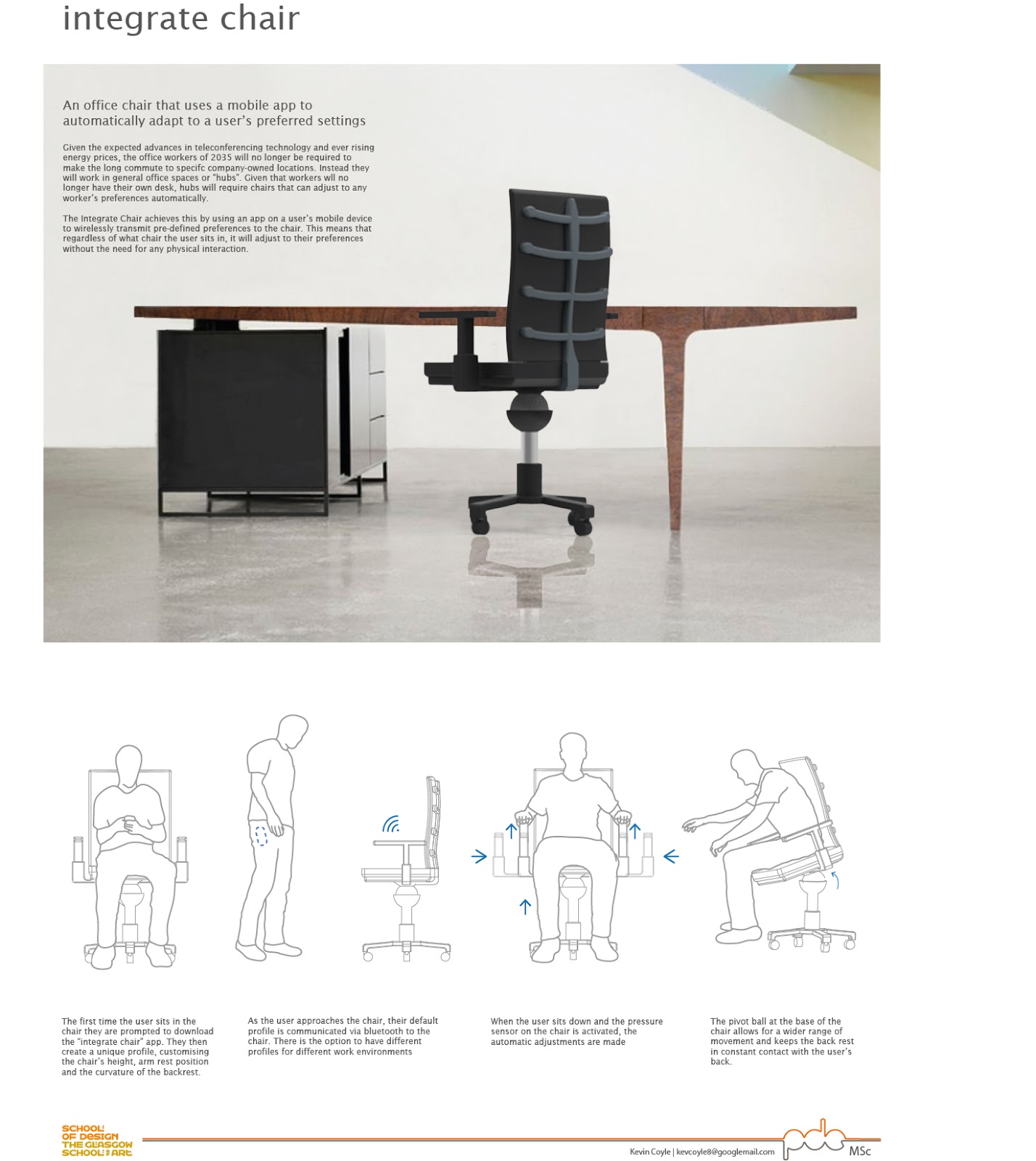
An office chair that uses a mobile app to automatically adapt to a user’s preferred settings

Given the expected advances in teleconferencing technology and ever rising energy prices, the office workers of 2035 will no longer be required to make the long commute to specifc company-owned locations. Instead they will work in general office spaces or “hubs”. Given that workers wll no longer have their own desk, hubs will require chairs that can adjust to any worker’s preferences automatically.

The Integrate Chair achieves this by using an app on a user’s mobile device to wirelessly transmit pre-defined preferences to the chair. This means that regardless of what chair the user sits in, it will adjust to their preferences without the need for any physical interaction.

Diagram 1

The first time the user sits in the chair they are prompted to download the “integrate chair” app. They then create a unique profile, customising the chair’s height, arm rest position and the curvature of the backrest.

Diagram 2

As the user approaches the chair, their default profile is communicated via bluetooth to the chair. There is also the option to have different profiles for different work environments.

Diagram 3

When the user sits down and the pressure sensor on the chair is activated, the automatic adjustments are made.

Diagram 4

The pivot ball at the base of the chair allows for a wider range of movement and keeps the back rest in constant contact with the user’s back.